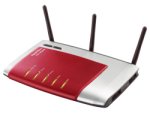
AVM's flagship product the Fritz!Box 7270 provides a great all in one VoIP solution. No other VoIP router of this class has so many business features.
Key Features:
- ADSL VoIP home gateway device
- Support for VPN client and server
- IP SIP server
- Real Time QoS Information
- Integrated DECT base station
- Failover to 3G Network via USB
- 10 SIP accounts
- USB file and print server
- Two FXS ports, One FXO port
- 4 Ethernet ports
- Fax machine
- Answerphone
This is the best UK Soho Soution available, praised and highly awarded in many UK technical papers:
There are two types of transfer on a Gigaset IP DECT phone. The first way is called a DECT transfer and can only be used to transfer a call to another handset registered to the same base station.
The second type is a SIP transfer and can be used to transfer a call to any other number using your VoIP service provider or PBX. Chances are this is the type of transfer you want to do so you can skip right to the SIP transfer section if you want to.
DECT/Internal Transfer How-To
- During a call, press the "int" key on the handset. This is usually the left hand button on the four way key in the middle but it depends on the handset model.
- The person you were talking to now hears some awful music on hold generated by the Gigaset phone itself!
- You will see a list of the other DECT devices registered to the base station, select one of these and it will ring.
- Announce the call and press the conf button just under the screen when ready to transfer.
- You will actually be in the 3-way conference now but if you don't want this then just hang up and the other two parties will be talking to each other.
SIP/External Transfer How-To
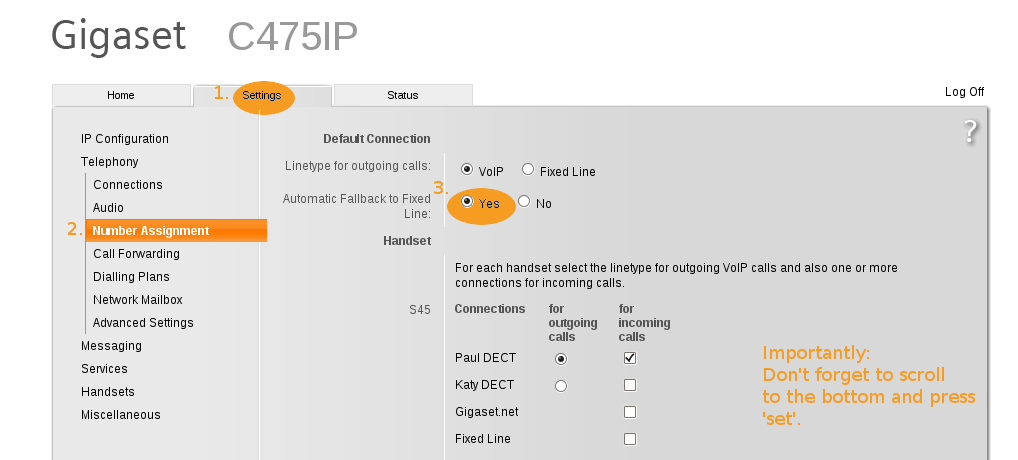
An external transfer is made a lot easier if you change a setting in the web interface of the phone before hand. You only need to do this once by the way!
The setting is called "Transfer Call by On-Hook" and is found by clicking "settings" then "telephony" and "advanced" in the web interface. Change it to "yes"
After this the actual transfer process is fairly straight forward:
- During a call, press the options button just under the screen and choose the ext call option.
- Dial a number and make a call as normal.
- When you are ready to transfer, simply press the hang up key on the Gigaset handset and the other two callers are connected.
We recommend and distribute the Jabra (GN Netcom) Wireless Headsets, GN9120 or GN9130.
However the following headsets are also compatible:
GN Netcom
- GN Ellipse, 8837-90-xx
- GN6210, 6210-0x
- GN9120, 9120-XX-0X
- GN9120, 9120-XX-1X
- GN9330, 9337-508-10x
- Jabra T 5330, 5317-408-101
- CS60, 36995-02
- CS70N, 39448-02
- SupraPlus Wireless CS351N, 39986-02
- SupraPlus Wireless CS361N, 39261-02
Plantronics
More details can be found on the Snom Wiki Page.
ProVu are currently the only Snom distributor in the UK who are able to offer Snom Certified Training Courses, as Snom recognise our unrivalled technical expertise.
After recently running a successful mini series of Snom Training Courses at our offices in Huddersfield, we're packing up our bags and heading down south!
The first session operating in the UK will be on Tuesday 10th November at University College London.
We combine the launch of the UK Snom Training Centre with the arrival of the first touch screen VoIP phone by Snom. The London Training Day will be run using the latest and greatest Snom 870 Touch Screen Executive VoIP Phone.
On the course, each attendee will receive:
- Snom 870 Touch Screen Executive Business VoIP Phone, RRP £319.00
- Snom WLAN USB Stick, RRP £34.00
- ProVu Snom Technical Guide - "101 Things You Didn't Know a Snom Phone Can Do".
- Snom Accreditation Certificate
- Snom Certified Value Added Reseller Status
- Refreshments and Buffet Lunch
- Invaluable Knowledge about VoIP and Snom
To ensure each delegate receives a high degree of personal tuition, entry is limited. We therefore recommend you book early to ensure a place is allocated to you.
Reserve a place. More information, course feedback and training day agenda.
The ManX system is aimed at existing call centre and PBX owners who want to add VoIP capability onto their existing phone systems.
An existing system may generally work well, but now require VoIP capability, particularly to provide better business solutions, call statistics and wall boards for example.
Many companies do not want to ditch their legacy systems as they have invested significant time and money in them. What they have been looking for is a method of adding VoIP capability onto their current system.
The response to ManX at the show was tremendous, ProVu are now rolling out their ManX reseller program with a very significant demand already being seen.
Key Features:
- Migrate your communications to VoIP at your own pace
- Add VoIP functionality alongside your existing phone system
- Easy to install – just connect two ISDN cables
- No need to change your current system or handsets
- Keep all your existing phone numbers
- Use SIP trunks to save on line rental
- Start connecting home workers and remote
- Provides upgrade path to full SARK VoIP phone system
This is a good one for checking the common issue where a customer has turned on Do-Not-Disturb without realising it or just seeing what's on the screen in general.
I have also used it to demonstrate the phone in training sessions.
You can view the bitmap currently shown on the phone's screen in a web browser by going to:
http://ip.addr.of.phone/screen.bmp
This works on all Snom phones (including the 800 series!) with version 7 firmware and up. It's a static image but you can keep hitting refresh in your browser to update the image.

Last month we told you about Paul's involvement in the filming of a security feature for the Channel Five programme The Gadget Show, reviewing the Siemens Gigaset HC450 Door Entry System.
The Gadget Show HC450 review was aired on Monday 21st September on Channel Five, revealing their favourite five home security gadgets, putting the HC450 on the top of the podium in the number one spot!
The review demonstrated all the great features of the Siemens Gigaset door entry system. They were particularly impressed with the HC450's ability to allow users to check who is at the door while they are away from home. Even calling it "genius".
For those of you who missed it - Check it out on Five's catch up website.
We also thought you might be interested in a little anecdote:
A courier company called at our chairman's house, where an HC450 is installed. When he answered the intercom from his mobile 200 miles away, he was able to arrange a new date for the parcel to be redelivered.
The driver was amazed: "Never seen anything like that before mate. Bloody brilliant device, makes our job much easier!"
:)
Should be the same in terms of flashing lights, but slightly different for call pickup.
It is to work around how Asterisk works without being patched.
Generally use BLF rather than extension with Asterisk.
See:
wiki.snom.com/Features/Call_Pick-Up
Paul and Ian are down at Call Centre Expo in the NEC, Birmingham for today and tomorrow. They are joined by Nelly from Snom and Jeff from Sark.
Demonstrating the Call Reporting, Call Recording and High Availability add ons for Sark PBX together with QueueMetrics Call Monitoring Software and Snom VoIP Phones.
If you've not been lucky enough to get your hands on a Snom 870 Touch Screen Phone or a Snom Meeting Point Conferencing Phone. Head down and try it out!
Entry is free, but you need to register beforehand at:
Register Online to Attend Call Centre Expo
Now all of the base stations within the range, have the ability to perform automatic failover to your landline. Quite simply, if for any reason your VoIP service or PBX fails causing your internet connection to go down, the Siemens Gigaset will automatically send calls over the landline connection plugged into the base station instead. No chance of missing an important call.
Just configure your base station to fail over to PSTN on the web interface.
Go to the address book on your handset.
- Select options on the soft key.
- From the options menu select copy list.
- From the generated list select which handset you wish to copy your address book to.

We know that Snom phones are fantastic. Now Avaya have recognised that too and declared Snom as an 'Interoperability Partner'.
This means, Snom VoIP phones are officially certified to interop with the Avaya IP-Office (SME PBX) AND Avaya officially support the Snom handsets with their aforementioned PBX.
Great stuff!
Read more about it.
Now in stock ready for next working day delivery.
The Snom 870 truly is the star of the range, with the first example of touch screen technology in Snom phones.
Top reasons to treat yourself:
- Touch screen high-resolution TFT colour display (4.2 inches, 480x272 pixels, 25 bits colour depth)
- Gigabit passthrough
- WiFi connection via Snom WLAN USB WiFi stick
- 12 freely programmable virtual keys
- Power over Ethernet
- 5 way conferencing
- 12 different SIP identities
- 29 Keys, 5 LED's
- Photographic caller ID
- 2 USB ports
More information on the Snom 870 Touch Screen Executive VoIP Business Phone.
08/09: We're on The Gadget Show!

They'd heard the buzz about the Siemens Gigaset HC450 Door Entry System and couldn't wait to review it, with a little help from ProVu.
The Gadget Show HC450 review will be aired on Monday 21st September, Channel Five at 8.30pm
Put the date in your diaries and set a reminder on your tellies!
Demonstrating all the great features of the Siemens Gigaset door entry system. If you miss it, don't worry - we'll be posting the video online for you to check out!
06/09: Follow ProVu on Twitter!

Follow us on Twitter.
We promise to tweet about all things VoIP and wonderful. Reporting to you what our most popular product of the week was, the best firmware versions, what's new in our warehouse and latest ProVu events.

Showcasing our ProTalk High Availability Systems, together with QueueMetrics Call Centre Package and the range of Snom VoIP Phones.
Also including features: Customised Call Statistics, Retrospective Call Recording and Hot Desking.
- Tuesday 22nd and Wednesday 23rd September 2009
- Hall 9, Stand D37
- From 10.00 to 16:30 Tuesday, to 16:00 Wednesday
- Birmingham National Exhibition Centre (NEC)
If you are planning to stop by and see us, please contact us to arrange a meeting time.
Register Online to Attend Call Centre Expo

The Yealink phones have been through our thorough testing process. Feature packed and great value for money.
This new range of VoIP desktop phones are now available from ProVu, as we continue to expand our range of products and services.
Yealink products are in stock now for next working day delivery.
View the Yealink Range and Product Specification.

With provisioning in place and a number of large installations successfully under our belt, the Grandstream range of VoIP phones are proving to be fantastic value for money and ideal for large scale deployments.
Explore the Grandstream BudgeTone and GXP Ranges.

The Snom Meeting Point SIP Conferencing Phone is perfect for use in middle to large conference rooms, for groups of up to 10 people.
Get a Snom Meeting Point for your meeting room or board room and benefit from the following.
Key Features:
- Backlit graphical LCD display - 128x64 pixels
- OmniSound full duplex broadband sound technology
- 5 way conferencing
- Supports power over ethernet
- Range up to 3 metres- suitable for 10 people
- Expandable microphones available to encompass larger range
- Management of internal and external telephone listings (LDAP)
- Microsoft OCS 2007 ready
- Multiple SIP registrations
More Information on Snom Meeting Point
Call recording feature is currently in development.

Snom OCS edition supports open SIP standard, working within your existing IP PBX.
Key Features:
- Incoming calls announced simultaneously on your desktop and your Snom phone
- Search for names or phone numbers on OCS via Snom Active Directory search (Snom LDAP)
- See the current status of your contacts (free, busy, do not disturb)
- Place secure calls both from your computer via Microsoft OCS or from your Snom phone
- Snom auto provisioning
- Open VPN support
- Snom XML mini browser
- Auto Attendant
Snom OCS Edition is available exclusively for specific projects. If you are interested in deploying Snom OCS Edition phones, please contact us to discuss the special firmware release.