Archives

You are currently viewing archive for February 2011
Category: General
Posted by: Tim
ProVu are receiving a lot of of enquiries about our new ProSys phone provisioning and management system.

Some common questions and answers below.


The ability to download stock/pricing will be useful to us as we
already run an in-house database for quoting and splitting e-commerce
orders to the current best price/stock suppliers.


This bit is easy

https://secure.provu.co.uk/prosys/price_list.php?XML=yes

or

https://secure.provu.co.uk/prosys/price_list.php?CSV=yes

Using your prosys username and password.

We may not use the XML ordering immediately but would be interested
in doing so. If we need to do this in order to take advantage of
provisioning then this wouldn't be an issue.


You don't need to use XML ordering from day 1. You can just place the orders manually using the online order form.

We can also test your first few orders here before the phones get shipped to makesure everything is working properly.

It would be very interesting if we were able to place orders whereby the phone arrives at the customer and provisions complete with the SIP line configuration as this would drastically reduce the turn around and shipping costs for our customers as we would not have to
either have the unit shipped to us first or go out to site to configure new phones. Is this what your provisioning service is about?


Yes. this is exactly what the system is designed to do. You place the order (manually or automatically using XML) including the delivery address and SIP details. We ship the phone to your end user with the configuration details ready to go and branded like it came from you.

So that is provisioning.

The next bit is phone management, which is for phones after they have been deployed. You can edit settings and view diagnostics on phones deployed onsite.

Category: General
Posted by: kate
snom video integration1. You can integrate video and can open doors with your snom phone when using the ProTalk SIP door entry phone
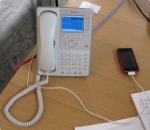
How: Connect your door with ProTalk door entry system and control it using snom phone. You can even see door phone video on snom 8xx series phone. The door phone has relays that can be activated using DTMF tones.

2. You can customise the screen of your snom phone
How: For the 821 and 870 use our idle screen generator or if you have a phone from the 3xx series view our information on snom screen branding

3. You can customise your ringtone
How: Choose your desired ringtone then visit our ringtone generator to upload it.

4. You can completely restyle your phone including touch screen buttons, icons and display colours (snom 370, 821 and 870)
How: visit the snom wiki guide on how to brand your phone

5. You can customise the outside look of your phone with a DesignSkin
How: visit snom DesignSkins and choose from many designs or even create your own.

6. You can add images of your contacts so that when they call, their picture appears (snom 821 and 870)
How: Browse to your phone and add a phone book entry. You can also add a nickname, e-mail address, birthday, include in a group and make them a favourite.

7. Stream videos on your snom 821 or 870
How: visit snom's video wiki guide for more information.

snom the iPhone phone changer8. You can charge your mobile through the USB port of your 821 or 870 snom phone
How: Simply plug in your mobile cable into the USB port of your phone, see the snom blog post.

9.You can create your own custom apps
How about being creative and making some really useful applications for your phone whether its a game or a calendar feed. snom shares some apps that other users have created on their did you know... webpage.

10. You can call people using click-to-dial
How: By integrating your snom phone with your existing database.

Have fun :)

Please note: we do not offer support on the services not provided by us
Category: General
Posted by: kate
UCExposnom will be launching its complete telephone solution, the snom ONE Plus, to the UK market at Unified Communications Expo in Olympia on 8th - 9th March. To find out more about the snom ONE plus, you can visit stand 717 in the Microsoft Partner Village at the UCExpo event.

Read more from snom Channel UK: snom UK to demonstrate new VoIP solutions at the Unified Communications Expo
Category: General
Posted by: kate

ProVu had a great day at the launch of the Gigaset pro range yesterday. Thank-you to everyone who came along

Even got a mention in Comms Dealer. Check it out - Comms Dealer: Gigaset aims to shake up SME IP PBX system market with UK channel campaign
Category: Technical Hints
Posted by: paul
We get asked this a fair bit here, I've compiled a quick list of the most common symptoms and causes with some possible solutions too:


Symptom: caller or callee hearing any of the following - clicks, periods of silence (voice stopping and starting), "robotic" sounding voice. This is by far the most common issue.

Cause: packet loss, can be due to lots of things, insufficient Internet bandwidth, lack of QoS on a connection shared with data, faulty network equipment (can include poor cabling), problems at the ISP.

More on bandwidth: a normal g711a VoIP call will require approximately 100kbps in both directions on the wire. The actual audio part is 64kbps but then you have to factor in RTP headers, IP headers, UDP headers etc... So it doesn't matter if you have a 10Mbps Internet connection if this only has 256kbps, then you will only ever get two VoIP calls and even this assumes you are doing pretty much nothing else with it.

----

Symptom: crackling during phone calls.

Cause: This is going to be a hardware issue with something like the phone's handset or handset cable. Or headset if a headset is being used.

----

Symptom: echo during calls, either the caller or callee hears their own voice coming back at them a fraction of a second after they spoke.

Cause: the fault usually lies with the person not hearing the echo. I.E. if a person you have phoned complains of echo then it is more than likely something on your phone causing it. The most common cause is people having handset volume turned up miles too loud, microphone gain too high or using a very poor quality handset or headset. It's normally going to be an acoustic problem. Although it can also be caused by phones with extremely poor quality hardware and not very good echo cancellation routines (was common in the very early days of VoIP).

----

Symptom: calls are too quiet, people who call me can't hear me or I can't hear them. My phone handset/headset volume is at full.

Cause: this is usually caused at the point where a call is translated from one format to another, such as inside a PBX converting an ISDN call to a SIP/RTP call. The fault needs to be fixed where at the cause rather than trying to mask the problem by turning handset volume up too loud (as this is likely lead to other problems such as echo on other calls). Most PBX systems will have settings to adjust gain levels when converting calls from one format to another. If this only occurs when using a headset, then check you are using the correct one for your phone.

----

Symptom: when using a headset, the person I am talking to can hear a buzzing on the line. For those in the know, it is a 50Hz "mains buzz".

Cause: this is caused by electrical interference being picked up by your headset's cable. Causes can be faulty electrical equipment (computer, computer screen etc...) nearby. One solution is to ground your phone somehow. Either install fully shielded network cabling (which isn't much use if you already have unshielded UTP cable installed throughout your building!). Or power your phone with a fully earth power supply, these are identifiable as they will have a 3-pin "IEC" connector from the wall socket to the power brick. Fortunately there is an easier answer which is to buy a headset which has a better quality shielded microphone.

----
Category: General
Posted by: kate
Becky's desk phone

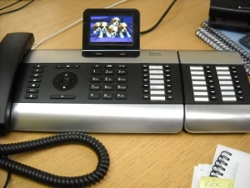
Look what has just just arrived on Becky's desk... The NEW Gigaset DE900 IP pro desk phone.


Had some fun this morning customising the screensaver with pictures of cute puppies :)


See the full Gigaset pro range


Category: General
Posted by: chris
ProVu have offered a white-label order fulfillment service for many years.

As a reseller, your customer orders from your site, you order from us and we ship as if it had come from you. "Simples".

What happens when they want to know the delivery status of their order? Using our white-labeled parcel tracking service you can offer your customer a link to a page with real-time tracking.

If you are interested in this service, please contact our sales team for pricing information.