Browse Tag

omada cloud

A Sweet Dream, or a Beautiful Nightmare?

Choosing the right networking platform shouldn’t give you nightmares.

With TP-Link Omada, you don’t have to compromise on performance, flexibility or value.

Whether you’re deploying a single customer site or managing networks across multiple locations, Omada Fusion offers a cost-effective alternative to UniFi Cloud Gateways and Dream Machines. Paired with our services, it can be a compelling option.

Full 2.5G Connectivity. Great Value.

Why pay more for features your customers don’t need?

The TP-Link Omada Fusion 2.5G delivers five 2.5G ports, an integrated network controller and competitive performance, all at an attractive price point.

Compared with the Ubiquiti UCG-Max, the Fusion offers the same full 2.5G port connectivity, while avoiding the additional NVMe storage hardware that many networking and VoIP deployments simply don’t require. This can help reduce exposure to the rising costs and supply uncertainties currently affecting memory-based components.

A Network Management Dream

One of Omada’s biggest advantages is the flexibility to choose how your networks are managed.

All-in-One: 

Combine routing + controller functionality in a single Fusion device

Cloud-Managed: 

Pair a more affordable router, such as the ER707-M2, with Omada’s cloud-based controller

Cloud Without Controller Hardware:

Omada Cloud Essentials offers a free cloud-hosted controller for smaller deployments, with paid & self-hosted options for more advanced requirements & management across multiple sites.

The result? More freedom over hardware costs and how you manage multiple customer sites.

And What About Ubiquiti UniFi?

UniFi offers a broad range of gateways and network management options, with models designed for different deployment sizes and requirements.

From multi-gigabit connectivity to integrated PoE capabilities, there’s plenty to consider when comparing the hardware.

Taking a More Technical Approach

The best gateway isn’t necessarily the one with the longest feature list. It’s the one that delivers the right performance, functionality and value for your customer’s needs.

Both TP-Link’s Omada Fusion 2.5G and Ubiquiti’s UCG-Max offer five 2.5G ports, built-in network management and support for deployments with hundreds of clients. But there are some important differences to consider:

Omada Fusion 2.5G

  • Lower market price: (approx. 27% less)
  • IPS/IDS throughput: 2.1 Gbps v 1.5 Gbps for UCG-Max (although Ubiquiti states up to approx. 2.3 Gbps with UniFi OS 4.1+)
  • Larger touchscreen: 2.51” v UCG-Max’s 0.96” display
  • More flexible mounting: Rack mounting is also available for Fusion, but unavailable for the UCG-Max
  • Built-in content filtering: 81 content-filter categories included

Ubiquiti UCG-Max

  • Built-in NVMe storage: 512GB for UniFi Protect applications, useful for customers using Ubiquiti’s camera ecosystem

The UCG-Max’s storage may be valuable for surveillance deployments, but for customers primarily focused on networking and VoIP, Fusion’s lower entry price could make it a more cost-effective choice.

The Reality Behind the Dream: What Matters to Your Customers? Not just the specifications, but the cost of the hardware and the features they’ll actually use must be considered to prevent an installation from becoming a nightmare.

Explore the Fusion Range

TP-Link’s Fusion Gateway Series covers a range of deployment requirements, with potential Ubiquiti comparisons including:

Fusion Max 10G PoE v UDM Pro Max or UDM SE (with PoE)
Fusion Max 10G v UDM Pro
Fusion Pro 10G v UCG-Fiber
Fusion Pro 2.5G PoE v UCG-Max & Flex 2.5G PoE
Fusion Pro 2.5G v UCG-Max
Fusion Pro Wi-Fi 7 v Unifi Dream Router 7
Fusion 2.5G & Fusion G+ v UCG-Ultra
Fusion Wi-Fi 7 v Unifi Express & Unifi Express 7

Make Every Deployment a Dream with ProVu

Great hardware is only part of the story. With ProVu, you can simplify the entire deployment process.

Our zero-touch provisioning service takes care of the groundwork, so your engineers don’t have to.

  • Devices arrive pre-assigned to the customer’s Omada site
  • No need to unbox devices to retrieve & enter individual device details
  • ProVu can ship directly to the deployment site
  • Orders can be placed through ProSys or your own API
  • UK-based stock, ready for quick dispatch
  • UK-based support available from our no-nonsense Tech Support Team
Less manual configuration. Fewer logistical headaches. More time for your next project.

Once your ProVu account is set up, you can easily order Omada devices through ProSys or your own API. All you need to do is get yourself set up first and you can do that by contacting us. Then include in all future Omada orders an Omada site name, then we’ll assign the product IDs and device details on your behalf and can ship directly to that site. There’s no need to wait to unbox the devices and DIY then post again; they’ll arrive at their final location for the next stage of configuration.

Ready to Rethink Your Next Network Deployment?

Discover how TP-Link Omada and ProVu can help you deliver reliable, cost-effective networking solutions without the deployment headaches. Speak with us today to get started. Call 01484 840048 or contact@provu.co.uk to speak with a member of our team.
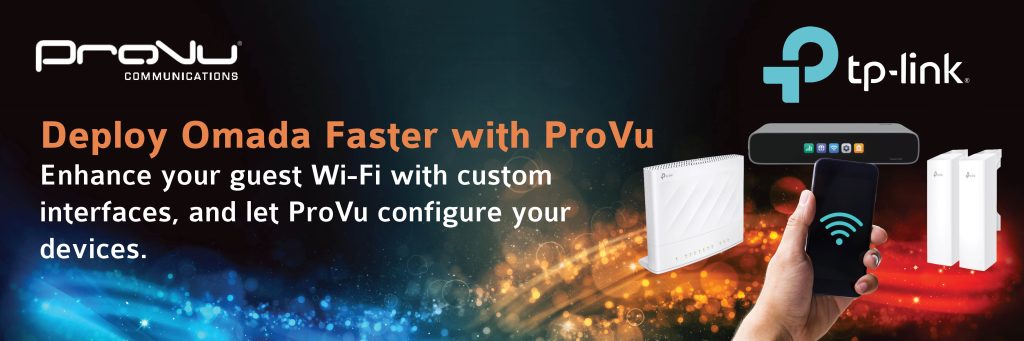
Deliver Branded Guest Wifi with TP-Link Omada

Guest Wi-Fi has become an essential service for businesses looking to improve customers’ experience while promoting their brand.

With TP-Link Omada’s branded captive portal, businesses can welcome guests with a fully customised login page featuring their logo, colours, promotional messaging and terms of access.

It’s a useful feature for a wide range of environments and sectors, including:

  • Hospitality
  • Retail
  • Offices
  • Healthcare
  • Education

All by helping businesses to provide secure guest access while creating a consistent and trustworthy branded experience.

See Omada’s Captive Portal in Action

And That’s Just One of Omada’s Features…

The captive portal is available on every version of the Omada Platform, including the free version called Omada Essentials.

Other features include:

  • Centralised cloud-based network management
  • Remote monitoring and management
  • Guest network and captive portal management
  • Network security and access control
  • Real-time network monitoring
  • Easy device adoption and configuration
  • Multi-site network management

With Omada, you can manage your network, devices, and users from the one comprehensive platform, making setup and ongoing management simpler.

NEW! Save Time on Your Omada Deployments with ProVu

Did you know we can now push your Omada devices directly to your own Omada platform?

Let us help you speed up your setup and save on installation costs with our new deployment service.

To get started, get in touch with us via phone (01484 840048) or email to walk through your requirements for setting up your Omada push services for your future orders.

Once your requirements are known and the process is created, you will be able to key in your configuration details through ProSys, and we’ll apply the settings to your Omada devices before dispatch.

Ready to Streamline Your Next Omada Deployment?

Get in touch with our team to learn more about our Omada services and how our pre-configured solutions can help you deploy networks faster.

You can explore the entire TPLink Omada product range and prices via our reseller portal, ProSys. Call us on 01484 840048 or email contact@provu.co.uk to place your order.

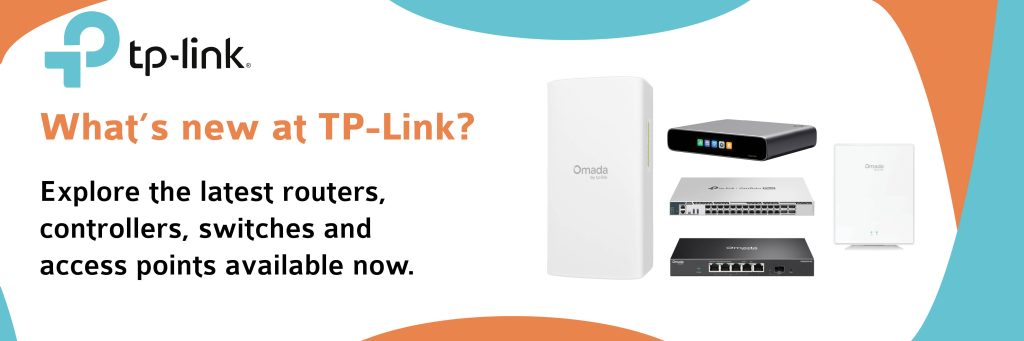
What’s New From TP-Link?

We have great news! The latest additions to the TP-Link business networking portfolio have arrived, bringing even more performance, flexibility and simplicity to your network.

Are your customers looking to:

  • upgrade core infrastructure?
  • deploy faster wireless connectivity?
    or
  • extend networks over long distances?

These new solutions are designed to help build smarter, more reliable business networks.

Featured Products

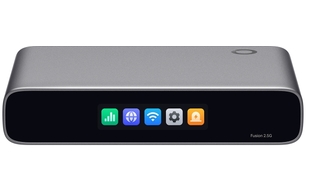
Next-Gen Business Router

  • 5 RJ45 ports
  • 1 decicated WAN
  • 4 configurable LAN/WAN ports

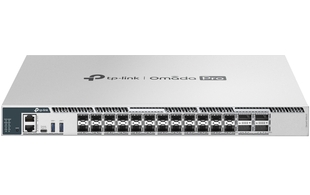
High-Performance Switch

  • 3 LAN ports (RJ45, USB-C, 1 RJM45 management)
  • 24 SFP28 ports
  • 4 QSFP28 ports

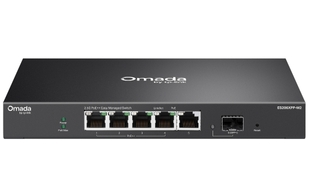
Multi-Gig Switch with PoE++

  • 5 LAN ports (4 RJ45 PoE++ compliant & 1 10Gbps SFP+)
  • 4 PoE ports

Long-Range Wireless Bridge Kit

  • 5GHz frequency
  • Up to 867Mbps wireless speed
  • Up to 5 km transmission distance

Business-Class Wi-Fi Access Point

  • 1 GPON optical port
  • 4 Gigabit Ethernet RJ45 ports
  • 1 FXS RJ11 port

Manage It All Through Omada Cloud

Across all deployments, Omada Cloud gives you centralised control. With no per-AP license fees or subscription lock in, you can control multiple sites/tenants from a single interface. Your outwardly-facing login screens can be branded at no extra cost, giving your customers a smooth and professional view of your organisation.

Ready to Upgrade?

Explore the latest TP-Link business networking solutions and discover how they can help you build faster, smarter and more resilient networks.

Let’s Develop Your Customers’ Ultra-Fast Infrastructure

Please call 01484 840048 or email contact@provu.co.uk. Pricing and stock information can be seen on our reseller portal, ProSys.

The ProVu Team.

TP-Link’s Devices for the Education Sector

Helping Your Customers Choose their Campus Network

As schools, colleges, and universities continue to modernise their digital infrastructure, many are asking should they invest in Wi-Fi 7 technology today, or maximise value with a proven Wi-Fi 6 setup? With TP-Link Omada’s expanding portfolio, your customers have a wonderful amount of choice whichever path is taken.

Why Choose TP-Link Omada for Education?

TP-Link offers scalable devices that meet the demands of staff and students through:

  • Cloud-managed networking from a single platform
  • Secure and reliable guest access
  • Scalable solutions for properties of any size
  • Centralised monitoring and troubleshooting
  • Industry-leading value and performance

Keep reading to find out more about the best TP-Link devices for education installations:

Future-Proofing Wi-Fi 7

By combining the EAP787 and the EAP773 Wi-Fi 7 access points with the SX3832MPP and the SX6632YF multi-gigabit switching, they deliver 6GHz connectivity, 10GbE uplinks, and exceptional performance for high-density spaces such as:

✓ Lecture Theatres
✓ Libraries
✓ Research Facilities
✓ Student Unions

Superior Value Wi-Fi 6

For schools and colleges seeking outstanding value, the EAP673 and the EAP653 Wi-Fi 6 access points paired with the SG3428XMP or the SG3452XP PoE switches provide reliable, high-performance connectivity for:

✓ Everyday Teaching
✓ Collaborative Workshops, Seminars and Classes
✓ Cloud Applications
✓ AI-Powered Learning Tools

Many institutions are adopting a hybrid strategy, installing Wi-Fi 7 devices in high-performance areas while using Wi-Fi 6 hardware across classrooms, offices, and accommodation blocks. This could be an excellent and viable option for your customers.

Which TP-Link Access Points & Switches Will Best Suit A School / College / University?

We recommend the following based on your size or education tier:

Primary / Secondary / Boarding School (below 1K users)

The EAP653 and the SG3428XMP or the SG3452XP for ICT classrooms, libraries and the reception area.

School / College (1-5K users)

The EAP653 or the EAP673 with the SG3428XMP or the SG3452XP with Wi-Fi 7 devices in libraries, study halls, common rooms, ICT suites, and auditoriums.

College / University (5–50K+ users)

Wi-Fi 7 EAP773 and SX3832MPP in lecture theatres, research buildings, engineering, media production, student unions.

Wi-Fi 6 EAP653 or EAP673 in offices, classrooms, seminar suites, halls of residence, and reception.

Manage It All Through Omada Cloud

Across all deployments, Omada Cloud gives you centralised control. With no per-AP license fees or subscription lock in, you can control multiple sites/tenants from a single interface. Your outwardly-facing login screens can be branded at no extra cost, giving your customers a smooth and professional view of your organisation.

Whether your customer prioritises future-proofing or value, we can help with choosing and delivering reliable, scalable networking solutions.

Get in touch today to discuss your requirements. Call us on 01484 840048 or email contact@provu.co.uk to speak with a member of the team.